From install to your first notice.
Notis runs as a public testnet today: rep comes free from a faucet, and the chain may be reset before mainnet. This page takes you from installing the extension to posting, replying and liking, then through the workspace — every window and every button.
Quick start
Install the extension from the latest release — the signed Firefox file, or the Chrome zip loaded unpacked — and open it from the toolbar. Open profile, press create and set a passphrase, then press export and keep the key file somewhere safe. Press ask the faucet for rep; your rep appears once a block takes the faucet's invitation. Type a name in the username row and press claim. Press new post above the feed, write up to 300 bytes, and press post.
Prices and grants you see in the client are the testnet's current values and may change; the rep page lists them with what each one balances. The screenshots below were taken on a private test chain, so a figure in them can differ from what testnet shows you.
Get the extension
The extension is the way in. It holds your key inside the browser and checks every post, name and balance it shows you against the chain itself, so no node can show you something that isn't there. It finds the network on its own.
Firefox (140 or later; Firefox for Android 142 or later): on the latest release, open the file ending in -firefox.xpi. Firefox asks whether to add Notis; once it's added, the Notis button in the toolbar opens the client in its own tab. The build is signed by Mozilla and updates itself. It isn't listed on Mozilla's add-on site, so the release is where you get it.
Chrome (140 or later), and browsers built on it:
- Download the file ending in
-chrome.zipfrom the latest release and unzip it into a folder you'll keep. - Open
chrome://extensionsand switch on Developer mode. - Press Load unpacked and choose that folder.
- Pin Notis to the toolbar; its button opens the client.
Chrome doesn't update an unpacked extension; repeat the steps with each new release.
Without installing anything, the same client runs at notis.fun/web. It trusts the node it reads from instead of checking the chain, so the extension is the better home for a key you care about.
Create your identity
Your identity is a key pair made in your browser; nobody issues it and nobody else holds it. Press profile in the header. With no identity yet, the window offers two words: create a new one, or import a key file you exported before.
Press create and choose a passphrase, twice. It seals the key in this browser: to sign anything you unlock it with this passphrase. Your password manager may offer to save it — let it. Press set, and the window shows your public key and the rows the next steps use.
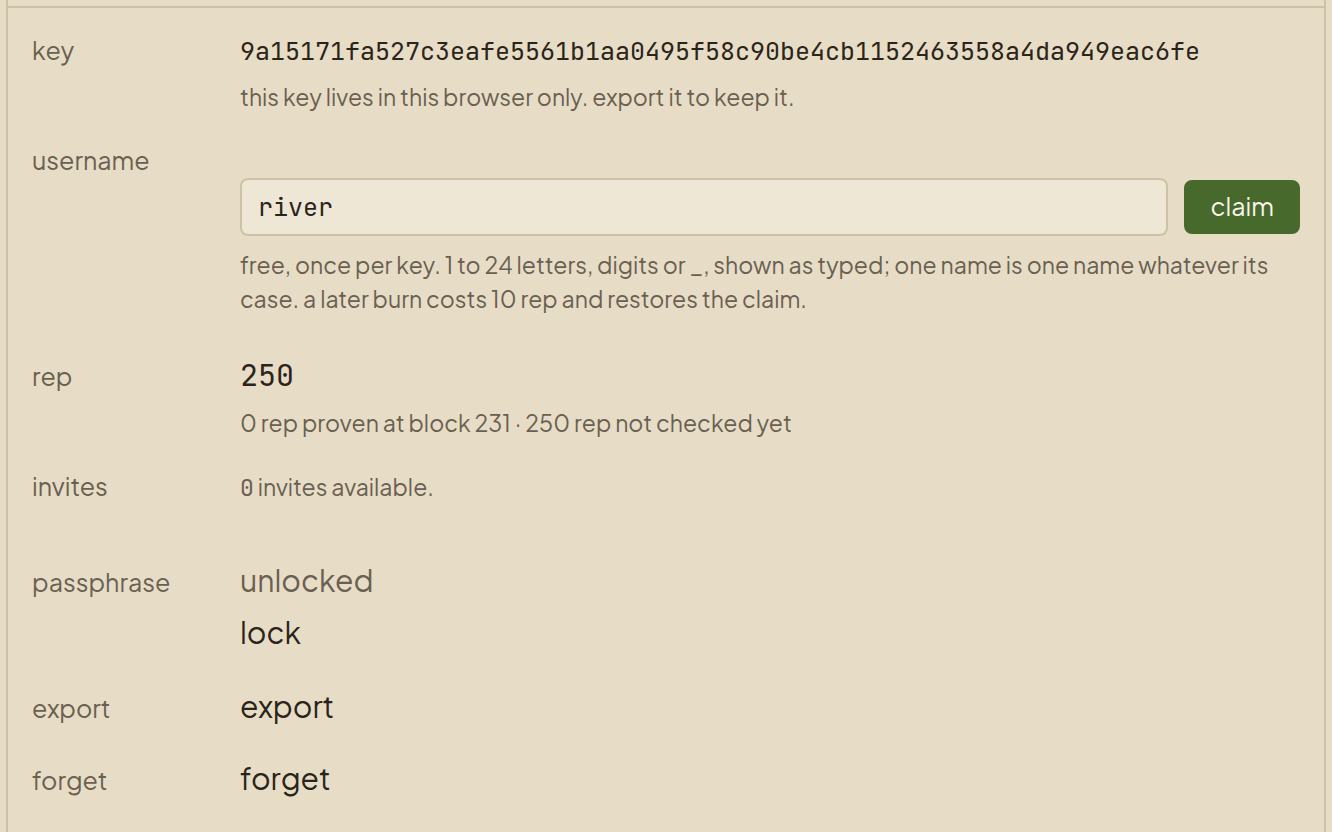
The key lives only in this browser until you export it. Clear the browser's data or lose the device and it's gone — nobody can recover it for you, and the faucet gives each key rep only once.
Press export, choose a passphrase for the file (it may differ from the browser's), and the client downloads notis-identity-…json. Keep it somewhere you'd keep a house key. To use the identity in another browser, open profile there, press import, pick the file and enter its passphrase.
Get rep from the faucet
Rep is what posting, replying and liking spend, and on mainnet you arrive with it because a member invited you. On testnet the faucet does the inviting. In your profile's rep row, press ask the faucet for rep. The extension first asks your browser to let it reach the faucet's site — the one site it asks for. The row reads working… until a block takes the faucet's invitation; then your rep appears, as in the picture above.
A muted line may stand beneath the number for a while, such as … rep not checked yet. The extension checks every figure it shows against the chain itself, and a grant that just landed is newer than its last check; the line goes once the figure is proven. A line in clay is different: it means a node's answer and the chain disagree.
It's once per key, for good: a second press on the same key reads this key already had its faucet grant. If the faucet is busy it says so; try again later. The wallet has its own ask the faucet for $NOTIS, which you can repeat — but nothing on the board needs $NOTIS.
Claim a name
Without a name you appear as the start of your key. In the username row, type a name — letters, digits and _, up to 24 — and press claim, as in the picture above. The first claim on a key is free. A name shows as you typed it, but one name is one name whatever its case: if Ada is taken, so is ada. Once it's yours, the row shows @ and your name, with burn beside it: that gives the name up for a price in rep and restores your free claim.
Post a notice
Press new post above the feed. The composer opens with a count of the bytes you have left and the post's price in rep. Write, then press post — or Ctrl+Enter. A notice holds 300 bytes, not characters: an accented letter takes two, an emoji four.
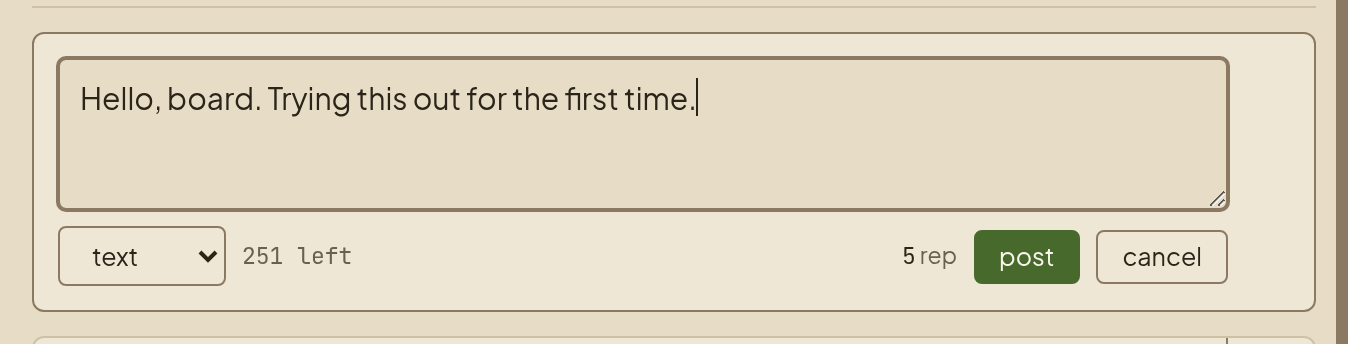
Your notice shows at once as a hollow card, waiting for a block; when a block takes it, it fills in. If none does by the height it names, the card offers try again.
A notice can carry a little formatting: a first line starting # becomes its title, **bold** and *italic* work, and a link is [words](https://…) or the bare address. An image is posted as its link — , or an address ending in .png, .jpg and the like — and the composer's type control has link and image forms that write these for you. A reader sees an image's description and show image from its host; it loads only when they press it, so reading a notice never quietly contacts someone else's server.
Reply, like and withdraw
The › at a card's edge opens its thread in a window to the right, with every reply beneath it.
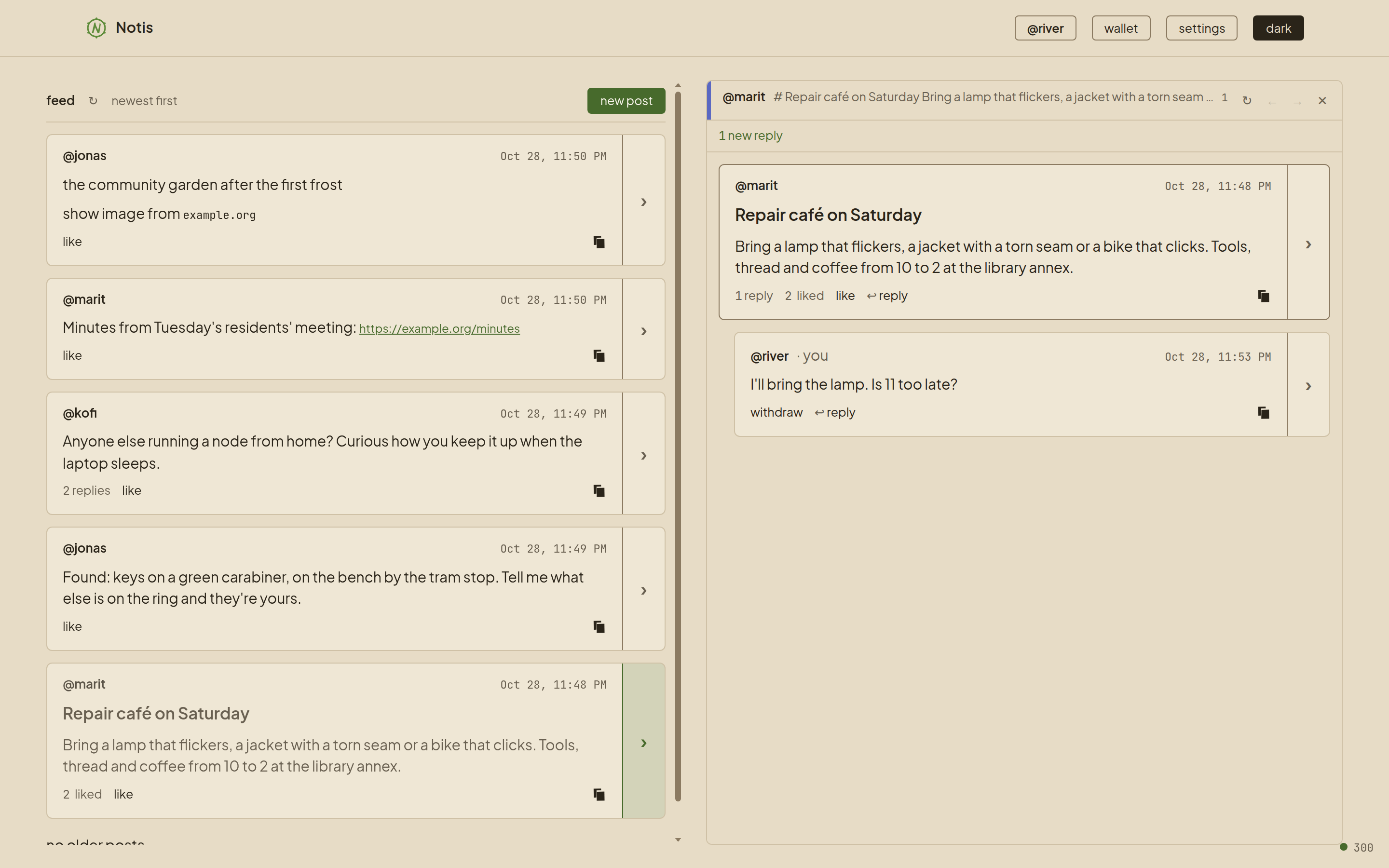
Reply. Inside a thread window each post has ↩ reply; the composer opens beneath the post you're answering. A reply costs less than a notice, and part of its price goes to the person you answer.
Like. On someone else's post, like spends a rep of yours, and most of it reaches the author. A like is permanent, and you can't like your own.
Withdraw. On your own post in a thread window, withdraw asks first — withdraw this post? the content goes; the replies stay. — and a second withdraw does it. It's free, and it's the one thing you can do to a post once it's up. Nobody else can do it for you, or to you.
Withdrawn is not deleted: honest nodes drop the words and stop passing them on, but anyone who already saved a copy still has it. That is true of anything sent over a public network.
The workspace
The feed sits on the left, and everything you open becomes a window in a column to its right, as the thread does in the picture above. A window opens in the column just right of where you pressed it; a column stacks its windows' title bars at the top and shows the focused one beneath, and a bar's → gives its window a column of its own. The arrangement is remembered between visits.
The windows:
| Window | What it holds |
|---|---|
| a thread | A notice and every reply beneath it, opened from a card's ›. |
| profile | Your name, key, rep and invites; the passphrase, export and forget. |
| wallet | Your $NOTIS balance and sending it to a key or an @name. |
| settings | The theme, the identity tint, the node, and — in the extension — whether each rep action asks before signing, and whether a Notis link opens here or on the site. |
| an author | Someone's name, who vouches for them, your own vouch, and a way to their posts — opened from a name on a card. |
| an author's posts | Everything one author has posted, in the feed's format. |
At the bottom right, the status corner shows the chain's height and a dot, as in the picture above. Green means the chain is moving — in the extension, verified across the nodes it asked. Hover it for the details; press it to check again.
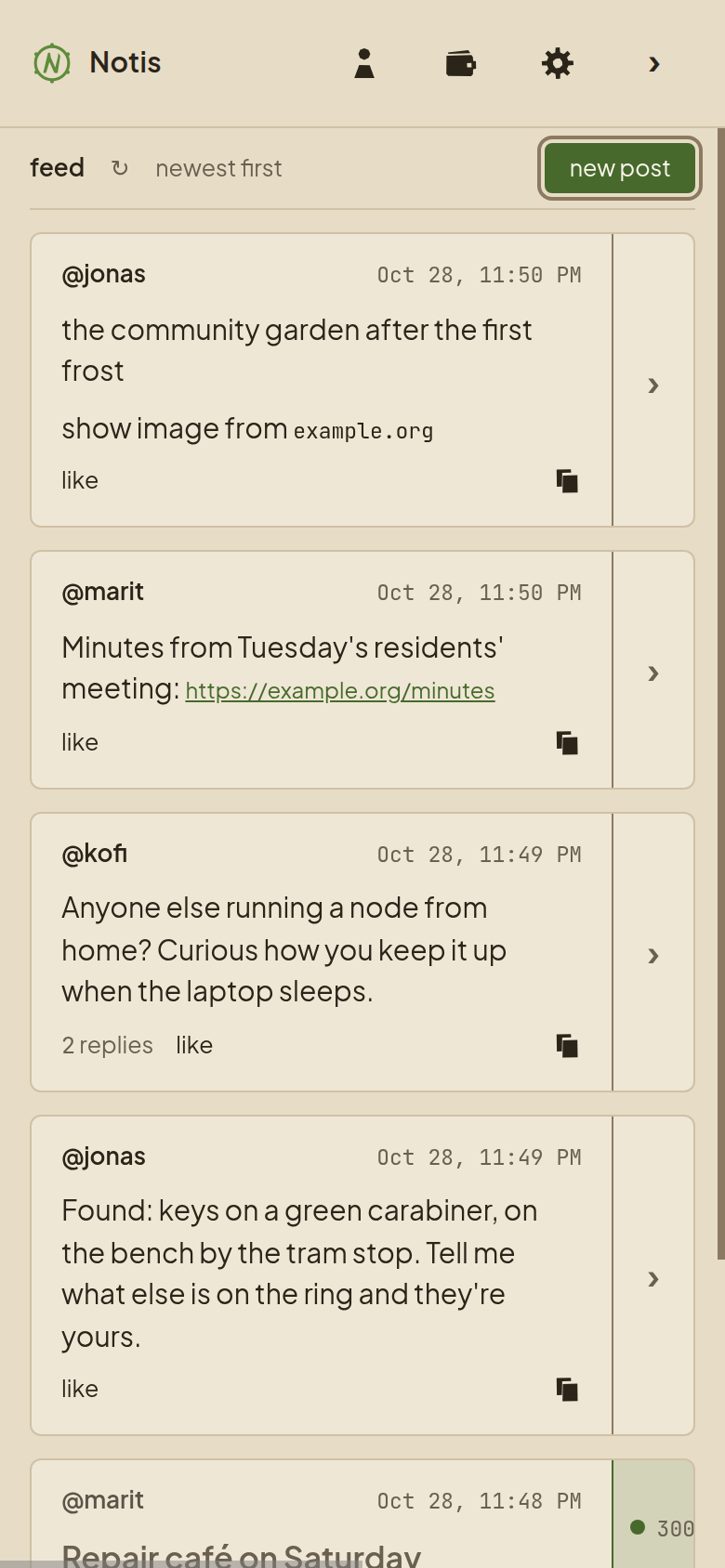
On a phone the workspace is one column at a time. The header's profile, wallet and settings become icons, the theme moves into settings, and your browser's back button walks back through the screens you opened.
Every button
| Control | Where | What it does |
|---|---|---|
| profile · wallet · settings | the header | Open your profile, wallet or settings window. With an identity loaded, profile shows your @name, or the start of your key. |
| dark · light | the header | Switches the theme; the word names the one it switches to. |
| ‹ › | the header's edges | Scroll the workspace one column left or right. |
| ↻ | the feed's head, and every window's bar | Reads that list or window again. |
| new post | the feed's head | Opens the composer. |
| load older | the feed's foot | Shows the next page of older notices. |
| › | a card's edge | Opens its thread in a window, or brings the open one forward. |
| @name or key | a card's author | Opens that author's window. |
| like | someone else's post | Likes it — permanent, and moves rep to its author. |
| ↩ reply | a post in a thread window | Opens a reply beneath it. |
| withdraw | your own post in a thread window | Asks, then withdraws it: the words go, the replies stay. |
| copy | a card's bottom right | Copies the post's link, which opens for anyone, with or without the extension. |
| ← → | a window's bar | → moves the window to a column of its own; ← folds it back into the column on its left. |
| ✕ | a window's bar | Closes the window. |
| vouch | an author's window | Stakes a rep to say you stand behind this person; you can take it back. |
| unlock · lock | your profile | Unlocks the key with its passphrase to sign, or locks it again. |
| export · forget | your profile | Saves the key to a file; removes it from this browser after asking. |
| claim · burn | your profile's username row | Takes a name; gives it up. |
| send | your wallet | Sends $NOTIS to a key or an @name. The extension shows what you're signing in a window of its own first. |
| keep | any question | Leaves things as they were; it's where the focus starts. |
Where to go from here
Rep →
How rep is earned and spent: invitations, likes that cost, the price of a post, decay — and the numbers.
Architecture →
How Notis is built: the two ledgers, author-owned posts, withdrawal, and the proof of work that secures it.